Tip
TipThe E-mail Settings page lets you configure the settings for sending emails from FASTER Web.
Tip
To view the Email Settings page, click the Email Settings link.
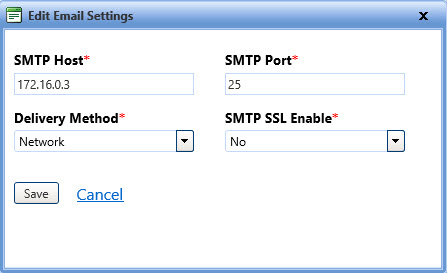
The Edit Email Settings dialog box lets you configure the email settings in FASTER Web.
Tip
To view the Edit Email Settings page, click the Edit Email Settings link.
1. Click the Setup module.
2. In the Administrative Setup section, do one of the following:
o Click  next to the Email Administration option, and then click Email Settings.
o In the Email Administration section of Administrative Setup, click the Email Settings link.
The Email Settings page opens.
3. Click the Edit Settings link.
The Edit Email Settings dialog box opens.
4. Specify the following details:
o In the SMTP Host box, type the server that sends an email.
o In the SMTP Port box, type the SMTP port number.
o In the Delivery Method list, select the delivery method of emails.
o In the SMTP SSL Enable list, select Yes, if you want the SSL support to send emails.
5. When finished, do one of the following
o Save to save the information and close the dialog box.
o Cancel to disregard any changes and close the dialog box.