Tip
TipIndirect labor refers to the time when technicians are not working on a repair. It refers to the time spent on the activities such as lunch, cleanup, meeting, emergency operations, training, supervision, and other tasks. The Indirect Labor Settings section lets you define a default reason for indirect labour in FASTER Web.
Tip
To view the Edit Indirect Labour Settings dialog box, click the Edit Indirect labour settings link.
1. Click the Setup module.
2. In the Application Setup section, do one of the following:
o Click  next to the Maintenance option, and then click Settings.
o In the Maintenance section of Application Setup, click the Settings link.
The Maintenance Settings page opens.
3. In the Indirect Labor Settings section, click Edit Indirect Labor Settings.
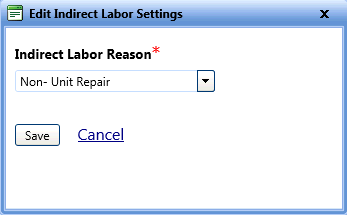
The Edit Indirect Labor Settings dialog box opens.
4. In the Indirect Labor Reason list, select a labor reason.
5. When finished, click one of the following:
o Save to save the information and close the dialog box.
o Cancel to disregard any changes and close the dialog box.